Find a smart lock that blends strong security with convenient access. This guide highlights five fingerprint-enabled options that suit different doors, lifestyles, and smart homes. Choose the one that fits your entry needs, whether you want Apple HomeKit compatibility, remote control, or fast biometric entry. The top picks are best for homeowners seeking modern keyless entry, apartment dwellers needing guest access, and users who prioritize remote monitoring and easy family sharing.
Summary at a glance: the five selected models below are evaluated for ease of use, connectivity, and access methods. If you want tight Apple HomeKit integration, ULTRALOQ Bolt shines. For remote, Wi-Fi-based control without extra hubs, Philips and eufy options are strong. For flexible access with multiple user types, Yamiry and Evanshow provide robust app and card/badge options. Use this table to quickly compare core capabilities and shopping considerations.
| Product | Best For | Main Benefit |
|---|---|---|
| ULTRALOQ Bolt Fingerprint Smart Lock | Apple HomeKit users | Built-in WiFi, HomeKit integration, guest share |
| Philips Wi-Fi Door Lock (B0FVWQ8R93) | Remote access fans | Built-in WiFi, voice control, multiple unlock methods |
| eufy Security Smart Lock C220 | Hands-free, long battery life | 8-month battery life, self-learning fingerprint |
| Yamiry Keyless Entry Digital Knob | Budget-friendly, easy installation | Bluetooth app control, 50 fingerprints/ passwords |
| Evanshow Fingerprint Door Lock | High-traffic entrances | 4-in-1 access, quick fingerprint |
ULTRALOQ Bolt Fingerprint Smart Lock
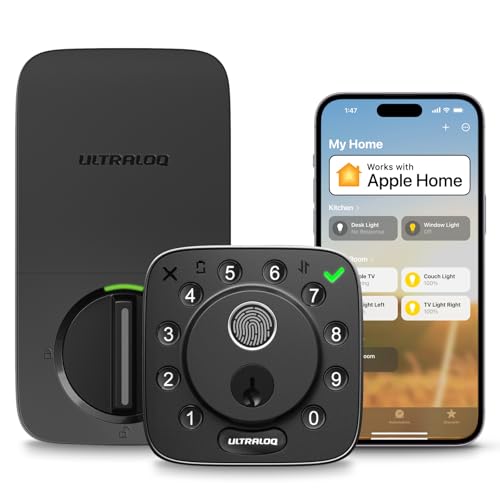
The ULTRALOQ Bolt integrates Apple Home support for a streamlined smart home experience. Best for buyers who want a single app to control entry while leveraging Siri for hands-free access. The lock supports fingerprint IDs (up to 50), 50 passcodes, and an app with remote unlock and auto-lock features. It also tracks who enters and when, which is useful for households or small offices. It includes a door sensor for status alerts and is compatible with HomePod or Apple TV as a hub for automations. A potential limitation is that it uses 2.4 GHz Wi‑Fi only, so a direct hub may be needed for some networks.
Who this is best for: homeowners who use Apple devices and want secure, remote management of door access. Why selected: strongest integration with Apple ecosystem and robust access logs make daily use effortless for families and guests.
Caution: If your Wi‑Fi is unstable or you require a bridge for certain automations, verify hub compatibility and network range before installation.
Philips Wi‑Fi Door Lock (B0FVWQ8R93)

This Philips model centers remote access through built-in Wi‑Fi, enabling lock and unlock from anywhere via the app. It supports multiple unlock methods: fingerprint, passcode, physical key, and voice control with Google Assistant or Amazon Alexa. Family access can be managed with temporary codes and fingerprints, making it suitable for households, renters, and small offices. It markets as compatible with 2.4 GHz networks only, which can affect remote reliability if network conditions are poor. A potential limitation is battery dependency and the need to keep the router within 65 feet for the best range.
Who this is best for: households needing flexible access methods and remote monitoring. Why selected: strong multi-way entry options and straightforward guest access management make it a versatile choice for everyday life.
Caution: Ensure your Wi‑Fi network consistently supports 2.4 GHz for reliable operation and consider backup options during power or network outages.
Philips Wi‑Fi Door Lock (B0F5QKCD3S)

Designed for flexible entry, this Philips model emphasizes app-based control, remote access, and voice commands via Alexa or Google Assistant. It supports app-based unlocking, fingerprint, passcode, and a physical key. It also allows for two-factor access planning through guest codes and administrators. Notable is its note that the lock requires a 2.4 GHz wireless network and has a recommended operating range with the router for best performance. It’s a strong pick when you want voice control integrated with a broader smart home setup.
Who this is best for: users seeking a highly flexible setup with voice assistants and remote door status monitoring. Why selected: seamless integration with smart home routines and guest access features suit modern apartment living or family homes.
Caution: Network stability and router placement can influence the remote control experience; plan your Wi‑Fi layout accordingly.
eufy Security Smart Lock C220

The C220 model from eufy Security emphasizes built-in Wi‑Fi without an external bridge and offers a self-learning fingerprint system. It supports multiple unlock methods via smartphone app, keypad, fingerprint, or keys, with remote access through the app. The battery life is estimated at up to eight months with AA batteries, which reduces maintenance concerns in the long term. It integrates with ecologically compatible ecosystems and supports routine automation with other eufy devices. A limitation is that battery replacements are essential for continued operation, and heavy usage can shorten battery life.
Who this is best for: busy households that want reliable remote control and a long-lasting lock battery. Why selected: built-in Wi‑Fi and an AI-enhanced fingerprint system provide dependable access and easy management from anywhere.
Caution: Plan for regular battery checks and carry a physical key as a backup during extended remote outages or power issues.
Yamiry Keypad Smart Door Lock With Knob

This Yamiry model combines a keypad and fingerprint entry with a traditional knob handle. It’s built to fit most American standard doors and installs with a screwdriver, offering 50 stored passwords and fingerprints plus potential app-based control when paired with a Wi‑Fi gateway (sold separately). Best for budget-conscious buyers who want a straightforward installation and a robust local control option. A potential limitation is that Bluetooth linkage relies on nearby proximity; remote control requires the gateway device to be present and configured.
Who this is best for: homeowners needing a simple, affordable smart lock that’s easy to install. Why selected: solid core features with a straightforward app experience and multiple user options for entry.
Caution: Bluetooth-based control is less convenient when you’re away from home unless you add the gateway for remote access.
Evanshow Fingerprint Door Lock With Keypad

The Evanshow lock offers a 4-in-1 access system: fingerprint, password, two mechanical keys, and IC cards. It supports up to 100 fingerprints and 50 passwords, enabling multiple family members or guests to unlock quickly. The fingerprint recognition is stated to be fast (about 0.5 seconds) and reliable. A key caution is the administrator fingerprint setup requirement; without an admin registered first, the system may behave unexpectedly with new users. It’s ideal for high-traffic areas like apartments or offices where quick, reliable access is important.
Who this is best for: locations with frequent entrants and a need for rapid biometric entry. Why selected: strong fingerprint performance and flexible user management suit busy households or small offices.
Caution: Ensure a proper initial admin setup to prevent unintended unlocks during setup or guest registration.
Buying Guide
- What unlock methods do you need? Consider fingerprint, passcode, key, and app-based entry. Some models also offer voice control.
- Do you want built-in Wi‑Fi or require a bridge? Built-in Wi‑Fi enables remote access without extra hardware but may depend on network quality.
- How many users and fingerprints will you manage? Look for a model that supports enough fingerprints, codes, and legitimate admin control.
- Smart home ecosystem compatibility: If you use Apple HomeKit (Siri), Google Assistant, or Amazon Alexa, verify official compatibility to realize automations and voice control.
- Security and power considerations: check battery life, backup power options, and ease of installation. Some locks rely on 2.4 GHz networks; ensure your router supports this band.
- Installation fit: ensure your door type and existing hardware are compatible with the lock’s mounting requirement and handle style.
FAQ
- Do fingerprint locks work during a power outage? Most rely on batteries; some models include USB power or keys for backup. Check specific model notes for emergency power options.
- Can I use these locks with my existing home automation? Many work with Apple HomeKit, Alexa, and Google Assistant; confirm compatibility with your hub and routines.
- Is remote access safe? Reputable models log entry activity and offer encrypted app connections. Always enable firmware updates and strong, unique passwords.
- What is the typical battery life? Options vary; some claim up to 8 months on AA batteries, while others need more frequent battery changes depending on usage and features like auto-unlock.
- Can multiple people unlock at once? Yes, most models provide multiple codes, fingerprints, or cards for family and guests with admin-controlled permissions.
- Which model is best for Apple users? The ULTRALOQ Bolt offers direct Apple Home integration, including shared access via the Home app and Siri control when paired with a Home hub.