RFID tag door locks offer convenient, keyless access with strong control for residents and small offices. This article highlights five practical options, explaining who they’re best for and why they fit typical door setups. Each product section includes clear unlock methods, installation notes, and potential limitations to help you choose confidently.
| Product | Key Unlock Methods | Best For | Notes |
|---|---|---|---|
| ETEKJOY Electronic Door Lock (3-in-1) | RFID Card/Tag, Password, Mechanical Key | Home or small office doors needing flexible admin/guest cards | Left/Right reversible lever; two admin cards; auto re-lock; door prep requires two holes |
| TMEZON Smart Door Lock | Fingerprint, Passcode, App Control, IC Cards, Keys | Tech-savvy users seeking app control and biometric access | Tuya app support; not Wi-Fi; fast fingerprint unlock |
| IC Card*4 Pcs for TTLock/Smart Life | IC Cards (4 pcs), compatible with TTLock/Smart Life/Tuya | Existing TTLock setups needing quick card-based access | 13.56MHz IC cards; adds convenience for compatible systems |
| Dormakaba 790 RFID Lock | RFID | Integrated dormakaba environments or Atlas/Front Desk combos | Specialized compatibility; not for Ambiance/System 6000 |
| Getmorv 100PCS 125KHz RFID Key Fob | 125KHz key fobs | Existing 125KHz systems needing additional non-writable fobs | Read-only, unencrypted; supports EM4100/4102 tags |
ETEKJOY Electronic Door Lock (3-in-1)
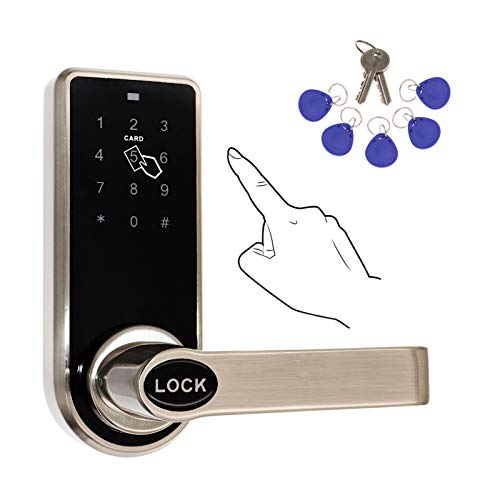
This 3-in-1 door lock supports RFID Card/Tag access, a password, and a mechanical key, offering multiple entry methods for varied scenarios. It is best for interior doors in homes or small offices that need flexible admin and guest access. The lock is reversible to fit both left- and right-handed doors and features auto re-lock. Caution: installation requires two door holes; a single-hole door would need an additional bore for full fit.
- Two admin cards and 200 guest cards can be added; password support with garbled-code protection.
- Adjustable backset for standard interior doors (2-3/8″ or 2-3/4″).
- Not suitable for outdoor use.
TMEZON Smart Door Lock

This smart lock combines biometric and code-based entry with app control, suitable for tech-forward homes or small offices. Unlock options include fingerprint, passcode, IC cards, and physical keys, with TUYA app management for user sharing, log checks, and remote-like convenience. It offers quick biometric access, reducing the need to carry keys. Caution: Requires initial wake-up for fingerprint or code unlock, and it does not rely on Wi-Fi connectivity, which may limit remote functionality.
- Supports 50+ fingerprints and 100+ IC cards for scalable use.
- App control via TUYA Bluetooth (no ongoing fees).
- Not a Wi-Fi-enabled device; works with local Bluetooth range.
IC Card*4 Pcs for TTLock/Smart Life

These IC cards are designed for TTLock, Smart Life, and Tuya smart locks, offering a straightforward way to add access without smartphones. They work at 13.56MHz and are suitable for compatible systems seeking quick, card-based enrollment. Caution: Not compatible with encrypted tags or non-125KHz/13.56MHz frequencies. Best for existing 13.56MHz ecosystems that support IC-card entry.
- Durable 13.56MHz cards compatible with major smart lock platforms.
- Great for households or offices adding card-based access alongside apps.
- Not suitable for non-compatible systems or encrypted tags.
Getmorv 100PCS 125KHz Key Fob

These 125KHz RFID key fobs are ideal for existing 125KHz systems requiring simple, read-only access tokens. They are compatible with universal 125KHz tags like EM4100/4102 and are not rewritable or encrypted. Choose this if your lock or system explicitly uses 125KHz tags and you need bulk, pre-programmed fobs. Caution: Not compatible with 13.56MHz or encrypted systems.
- Read-only, pre-programmed IDs simplify management.
- Ideal for legacy or simple access control ecosystems.
- Not suitable for encryption-enabled or 13.56MHz systems.
Buying Guide
What unlock method is best for you?
Choose a lock with the unlock methods that fit your daily routine. Biometric and app control are convenient for frequent users, while RFID cards work well in multi-user households or offices. If you need quick, offline access with no internet dependence, consider devices with local Bluetooth or keypad options.
Door compatibility and installation
Interior doors with standard latch setups are easiest to install. Check backset options (2-3/8″ or 2-3/4″) and whether the lever is reversible for left- or right-handed doors. Some models require two door holes; verify your door profile before purchasing.
Security and access management
Look for features like multiple admin cards, password protection, and the ability to add or remove users without reprogramming the entire system. For remote or app-based locks, confirm how log records, user sharing, and security prompts are handled by the app.
Frequency and compatibility
RFID systems use different frequencies (125KHz vs 13.56MHz). Ensure your cards, fobs, or ICs match your chosen lock’s frequency. Encryption and compatibility with specific ecosystems (TTLock, Smart Life, Tuya, Dormakaba Atlas) determine whether to buy cards or the entire lock system.
Cautions and limitations
Some locks are designed strictly for interior use and are not weatherproof. Always verify installation requirements, door thickness, and backset compatibility. Note any lock-specific limitations such as non-Wi-Fi operation or reliance on Bluetooth for app control.
Quick comparison snapshot
- Best for multi-entry households: ETEKJOY Electronic Door Lock (3-in-1).
- Best for biometric lovers: TMEZON Smart Door Lock.
- Best for TTLock or Smart Life users: IC Card*4 Pcs for TTLock.
- Best for existing 125KHz systems: Getmorv 125KHz Key Fob.
- Best for specialized dormakaba setups: Dormakaba 790 RFID Lock (Atlas/Front Desk integration).
FAQ
- What is the easiest RFID door lock for a non-technical user?
- Do RFID door locks require a Wi-Fi connection?
- Can I mix card frequencies with a single lock?
- Are these locks secure for outdoor use?
- What should I consider when upgrading to RFID entry?
- Do these locks support multiple administrators?
Biometric or keypad options with app support tend to be easiest, offering quick access without managing multiple cards.
Not always. Some locks use Bluetooth or local keypad/card methods and don’t require Wi-Fi, while others offer app control without constant internet access.
No. Ensure all cards or fobs match the lock’s frequency (125KHz or 13.56MHz) and are compatible with the lock’s system.
Most listed products are recommended for interior doors only. Outdoor-rated locks require weatherproofing and specialized hardware.
Assess door compatibility, unlock methods you prefer, user capacity, and whether you want app-based management or purely local access.
Yes, several models allow multiple admin cards or admin passwords with guest or user cards for scalable access control.