If you want to print directly on glass, choose equipment built for smooth surfaces, precise control, and safe operation. This guide highlights five top options that work well for glassware, cups, and decorative glass items. The best picks balance ease of use, versatility, and consistent results. Ideal buyers include hobbyists printing gifts, small shop owners expanding services, and production teams needing portable or desktop solutions. Below, compare which machine fits your glass-printing goals and where each excels.
| Product | Type | Best For |
|---|---|---|
| HTVRONT Auto Tumbler Heat Press | Tumbler/Mug Heat Press | 2.9″-3.2″ tumblers, glassware, mugs |
| Furvveerr A4 UV Printer | UV Flatbed Printer | Direct on glass, bottles, acrylics, and more |
| Leaice Handheld Inkjet Printer | Handheld Inkjet | Short runs on glass, metal, plastic; QR codes and batch codes |
| iottim Upgrade Handheld Inkjet Printer | Handheld Inkjet | Text, logos, dates on glass, metal, carton |
| KOONE Handheld Inkjet Printer | Handheld Inkjet | Flexible surfaces including glass; multi-line printing |
HTVRONT Auto Tumbler Heat Press

The HTVRONT tumbler heat press is designed to apply auto-adjusted pressure to cylindrical glassware and mugs. It automates pressure based on diameter, simplifying sublimation for glass tumblers and cups. Best for small studios or hobbyists who want consistent results with minimal manual effort. A notable safety feature is the auto-off timer after 15 minutes of inactivity and an emergency stop for quick heat release. This model accepts 2.9″ to 3.2″ tumblers, making it suitable for glassware and many mugs.
Best for: users who need a user-friendly, one-press workflow for glass tumblers and mugs. Choose this if you value automated pressure control and built-in safety features over manual control.
Caution: Ensure you follow the recommended heat-time and temperature parameters for glass materials to avoid thermal shock or image distortion. The plate size is optimized for tumblers, so larger glassware may require alternative equipment.
Leaice Handheld Inkjet Printer

The Leaice handheld inkjet printer offers extended print height and versatile ink for direct marking on glass surfaces. With a 1-inch (25.4 mm) maximum print height and adjustable multi-line capability, it’s well suited for batch dates, logos, and serial codes right on glass containers or decorative pieces. The device uses waterproof, quick-drying ink and supports multiple industrial applications beyond glass—ideal for warehousing, packaging lines, and craft studios.
Best for: customers needing a flexible handheld solution for direct-on-glass labeling, batch coding, and small-batch customization. It’s particularly useful when you want on-the-fly personalization without heat equipment.
Caution: Ink cartridges should be managed to prevent drying or clogging if the device sits unused. Print quality depends on surface texture and steadiness during operation.
iottim Upgrade Handheld Inkjet Printer

The iottim handheld printer is designed for quick, simple operation across materials such as glass, metal, and plastics. It features a 4.3-inch touchscreen and 42 ml solvent ink cartridge. The device supports variable data printing, including production dates, barcodes, and logos, making it a strong option for light industrial tasks or craft projects where direct-to-surface marking on glass is needed.
Best for: buyers who want a straightforward handheld printer with a touchscreen and versatile data printing for small-batch labeling on glass items.
Caution: While versatile, results can vary on highly curved or textured glass surfaces. Proper positioning and speed help maintain legible prints.
PEKOKO 10W Portable Laser Marking Machine
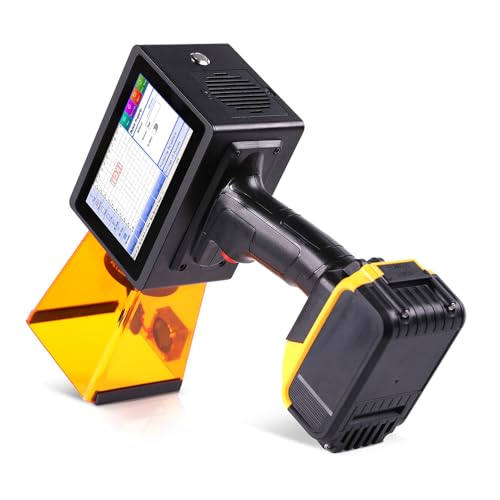
The PEKOKO laser marker is a handheld portable option for marking on metal, plastic, glass, and more. It emphasizes fast marking speeds and a built-in 5″ HD touchscreen with a focus on safety and ease of operation. This tool is best for permanent marks on glass surfaces where durability is essential, such as gifts or branded glassware. It’s particularly suitable for small batches needing crisp, precise engraving or deep laser marks.
Best for: users seeking permanent, high-contrast marks on glass, especially for branded items or gifts where durability matters. Consider this if you need long-lasting engravings rather than surface prints.
Caution: Laser marking can produce heat and residue; proper ventilation and eye protection are essential. It’s less suited for very delicate glass that could crack under heat exposure.
Buying Guide: Direct-Printing On Glass
Direct printing on glass requires choosing between heat-based transfer, UV-cured ink, inkjet on flat surfaces, and laser marking. Each method has distinct advantages and limitations for glassware and decorative glass items.
What to consider when selecting glass-printing equipment
- Surface compatibility: Glass quality, curvature, and texture influence print adhesion and readability.
- Method suitability: Heat presses work well for mugs and curved glass, while UV printers excel on hard surfaces without coatings. Inkjet printers offer flexible, on-demand marking, and laser markers provide permanent engravings.
- Print height and area: For text and logos, ensure the device can reach the desired height and surface area on the glass item.
- Safety features: Auto shutoff, emergency stop, and protective housings reduce risk when working with heat and lasers.
- Maintenance: Ink cartridges, nozzle cleanliness, and plate wear affect long-term performance and cost per piece.
- Portability vs. production scale: Handheld devices suit small runs and on-site work; desktop units fit batch work in a shop.
Direct vs. indirect methods: which is best for glass?
Direct methods (inkjet, UV, or laser) print or engrave directly on the glass surface, producing crisp results with minimal film layers. Indirect methods (heat transfer) rely on a substrate or coating and may require pre-treatment. For glassware, direct methods tend to give cleaner edges and better wear resistance, while transfer methods can offer broader color options and lower equipment costs for beginners.
FAQ for Glass Printing Purchases
- Can I print on curved glass with a heat press? Yes, but ensure the heat press has a curved plate or use a curved sleeve attachment to maintain uniform pressure.
- Is UV printing better than inkjet on glass? UV printing can bond directly to glass without coatings, but inkjet is often cheaper and versatile for small runs and batch labels.
- Does laser marking work on all glass types? Laser marking works on many glass types, but very thin or highly reflective glass can pose challenges and require careful power settings.
- Are handheld inkjet printers suitable for commercial glassware? They’re best for short runs and customization rather than high-volume production.
- What safety measures are important? Use eye protection with laser devices, ensure proper ventilation for solvents, and follow manufacturer safety instructions for heat devices.
- Can these machines print on decorative glass items? Yes, especially inkjet and UV printers, which can handle plaques, awards, and glass ornaments with appropriate inks.