Whether you’re upgrading a small mill, knee mill, or lathe, a digital readout (DRO) system helps you achieve repeatable, precise positioning. This guide highlights five DRO options well-suited for American workshops, spanning basic two-axis displays to full three-axis systems. Each choice targets distinct budgets and workflows, from hobbyist refinements to professional-grade accuracy. The buyer is guided to pick based on axis count, installation ease, and compatibility with common milling setups.
| Product | Brand | Axis Coverage | Best For | Why Pick |
|---|---|---|---|---|
| Digital LCD Linear 0-150mm/0-6inch | SHAHE | 1 Axis (X) | Smaller mills or hobby setups | Compact range with remote LCD, metric/inch readings |
| 3 Axis DRO LCD Screen | Baykunl | 3 Axes | Bridgeport-style mills and lathes | High integration, memory, and advanced functions |
| DRO Digital Readout 2 Axis | CHAWED | 2 Axes | Common 2-axis machines | Widely used, easy install, solid reading accuracy |
| 3 Axis Digital Readout for Bridgeport | ANBBIN | 3 Axes | Precision production milling | Long travel options, bright display |
| TOAUTO Customized 3 Axis DRO | TOAUTO | 3 Axes | Custom machine configurations | Customized X, Y, Z ranges to fit unique machines |
Digital LCD Linear 0-150mm/0-6″ DRO for Milling Machines
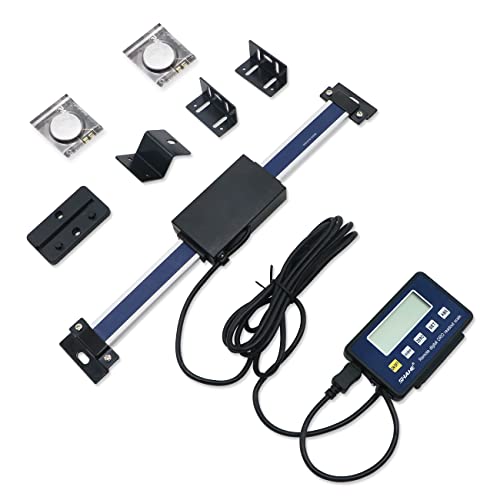
Best for compact mills requiring a single-axis readout. Features include a 0-150mm range, ±0.06mm accuracy, and a remote LCD display for easy visibility. Readings support metric, inches, and fractional formats. The remote display is ideal for setups where the operator sits away from the scale. Cautions: single-axis operation means you’ll need a separate DRO if your machine requires precise Z-axis feedback beyond this unit’s capacity.
3 Axis DRO LCD Screen for Bridgeport/Mill/Lathe

This 3-axis DRO is designed for Bridgeport-style mills and lathes, featuring a high-performance core, SDM memory for up to 200 sets, and power-off memory. It provides MM/INCH conversion and a robust display with advanced functions for beveling, drilling, and centering. Best for professional shops needing reliable, multi-axis feedback and memory capabilities. Limitation: more complex setup may require careful planning for machines with unusual travel lengths or non-standard mounting points.
DRO Digital Readout 2 Axis Screen for Milling/Lathe
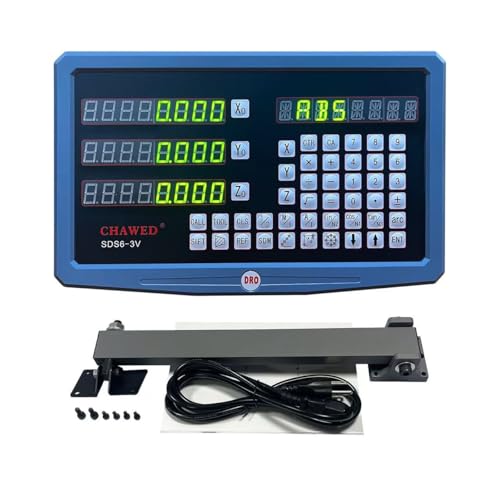
Designed for 2-axis applications, this CHAWED DRO provides glass-grade metrology scale feedback and a compact installation footprint. It supports multiple resolution options and is a practical upgrade for smaller machines where only X and Y or Z and Y feedback is required. Best for users who want straightforward, reliable two-axis readout without the complexity of a full 3-axis system. Caution: lacks a dedicated Z-axis option in this kit, which may be necessary for some vertical milling tasks.
3 Axis DRO Digital Readout with Linear Scale

ANBBIN’s 3-axis digital readout kit emphasizes a bright 3-axis display and linear glass scales across 12-inch to 30-inch travel ranges. It’s well-suited for mills and lathes requiring precise coordinate measurement and repeatable positioning. Best for industries emphasizing repeatable tooling offsets and alignment. Limitation: larger travel lengths may require longer scales and more mounting hardware, increasing setup time.
TOAUTO 3 Axis DRO Customized Kit

TOAUTO offers a customized 3-axis DRO kit with flexible X, Y, and Z travel options. This solution is ideal for machines with non-standard table sizes or unique travel requirements. It’s best for shops needing a tailored fit and precise coordinate monitoring across unusual configurations. Caution: customization may extend installation time and requires accurate specification submission for proper sizing.
Buying Guide
- Axis count matters. Two-axis systems cover most milling tasks, while three-axis DROs provide full XYZ feedback for complex operations.
- Travel length and mounting. Ensure the scales’ travel range matches your machine’s table or knee travel. Some kits offer customized lengths, which helps with non-standard machines.
- Accuracy and resolution. Look for manufacturer-specified accuracy (e.g., ±0.06mm or better) and resolution (e.g., 0.01mm). Higher precision suits high-precision work; lower-cost units may suffice for basic alignment.
- Display and readability. Remote LCD displays improve visibility during long sessions or when the operator sits away from the scale.
- Power and memory features. Some DROs offer memory for programs or off-power data retention; consider your workflow’s need to preserve measurements during power interruptions.
- Compatibility and mounting. Check compatibility with your machine type (Bridgeport, knee mills, lathes) and mounting hardware. Some kits come with comprehensive installation accessories, others require extra hardware.
Frequently Asked Questions
- What is a DRO and why do I need one? A DRO provides real-time position feedback for machine tools, increasing accuracy and repeatability in milling and turning operations.
- How many axes should I choose? For most basic milling tasks, two axes (X and Y) are enough; for more complex work, three-axis DROs (X, Y, Z) are recommended.
- Can I upgrade gradually? Yes. You can start with a single-axis or two-axis kit and add another axis later if your workflow requires it.
- Will a DRO fit any milling machine? Many DROs are adaptable, but verify travel lengths, mounting spacing, and power requirements before purchase.
- Are customized DRO kits worth it? Customized kits ensure an exact fit for non-standard machines, reducing fit problems and installation time.
- What about installation complexity? Simpler two-axis kits are quicker to install; three-axis and customized kits may require more planning and time.