Looking for space-saving wall-mounted data cabinets to organize IT gear and AV equipment? This guide highlights five top wall-mount server cabinets, chosen for tight spaces, security features, and adaptable configurations. Best for small offices, classrooms, retail spaces, or home labs needing secure, accessible rack solutions.
| Product | |||
|---|---|---|---|
| Tecmojo 6U Wall Mount Server Cabinet | 450mm | Small IT racks with lockable glass door access | Limited depth may require compact equipment |
| VEVOR 6U Wall Mount Network Cabinet | 15.5″ | Space-constrained spaces needing good airflow | 60-90W of equipment load not specified |
| NavePoint 12U Wall Mount Glass Door Cabinet | 450mm | 12U capacity with glass front and removable panels | Deeper depth may impact tight spots |
| ECHOGEAR 12U Network Rack | 600mm | All-in-one kit with shelves and pre-mounted fan | Depth may be too large for very tight walls |
| StarTech.com 2-Post 6U Wall Mount Cabinet | 15.0″ | Compact, lockable enclosure for shelves and switches | 2-post design may be less sturdy for heavier kits |
Tecmojo 6U Wall Mount Server Cabinet

Overview: 6U wall mount cabinet with dimensions 13.78″ H x 21.65″ W x 17.72″ D and a maximum mounting depth of 14.2″. Features a lockable glass door and side panels to deter unauthorized access. Front door orientation is adjustable, and rails are fully adjustable with numbered U positions for easy equipment mounting. Includes top and bottom punch-out panels for cable access.
- Best for: Small IT setups that require secure access and simple cable management in tight spaces.
- Why selected: Combines compact size with secure access and flexible door orientation for varied room layouts.
- Caution: Limited depth means larger servers or deeper equipment may not fit without rearranging components.
VEVOR 6U Wall Mount Network Cabinet

Overview: 6U cabinet with a maximum depth of 15.5″ designed to maximize space in retail locations, classrooms, and back offices. Ventilation-focused with heat-dissipation features and a robust welded frame. Rated for up to 100 lbs wall-mounted load and 200 lbs ground-mounted load.
- Best for: Environments needing better airflow and solid construction in a compact footprint.
- Why selected: Balances space savings with ventilation features to prevent overheating.
- Caution: Weight and depth limits should be matched to anticipated equipment loads.
NavePoint 12U Wall Mount Glass Door Cabinet
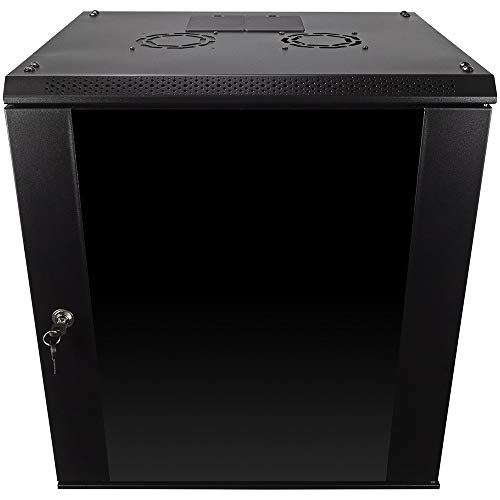
Overview: 12U cabinet with glass front door, locking mechanism, removable side panels, and a 450mm depth. Constructed from cold-rolled steel with a sturdy welded frame. Includes a security lock for controlled access and flexible internal mounting.
- Best for: Securely housing 19″ IT gear and AV equipment in space-limited rooms.
- Why selected: Provides 12U capacity with secure access and adjustable configuration options.
- Caution: Glass door adds a potential risk if accidental impact occurs; handle with care.
ECHOGEAR 12U Network Rack

Overview: All-in-one 12U wall mount rack with two included 1U shelves, pre-mounted fans, a lockable front door, and additional hardware. Depth accommodates 600mm installations, making it suitable for AV and IT gear in media-heavy environments.
- Best for: Users wanting a ready-to-install kit with built-in cooling and storage.
- Why selected: Combines multiple features into a single package for faster deployment in larger 12U spans.
- Caution: Deeper footprint may challenge very tight wall spaces.
StarTech.com 2-Post 6U Wall Mount Cabinet
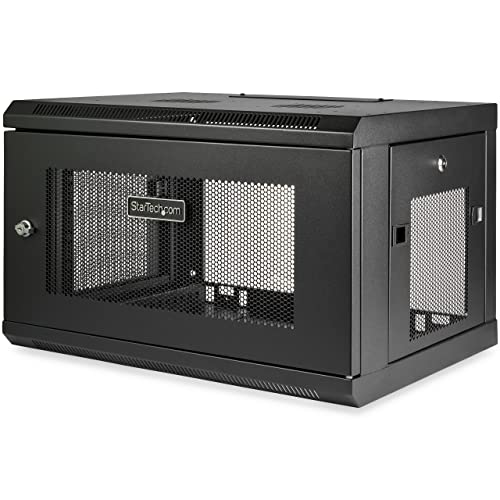
Overview: 6U wall-mount cabinet with a maximum mounting depth of 15.0″ and a 198 lb weight capacity. Enclosed, lockable design with a reversible, removable front door and removable side panels for flexible access to rear connections.
- Best for: Small IT setups requiring secure access and straightforward maintenance.
- Why selected: Two-post design keeps it compact while retaining strong support for standard 19″ gear.
- Caution: May be less rigid for heavier, high-density configurations compared to larger three- or four-post enclosures.
Buying Guide
What should you look for in a wall-mounted data cabinet?
Key considerations include depth, height (U size), weight capacity, door type, and security features. Choose a depth that accommodates your deepest device while leaving space for cabling and airflow. Locking doors and side panels protect critical gear in public or semi-public spaces. Ensure the mounting system supports your weight requirements and offers adjustable rails for flexible equipment placement.
How much space do you have, and what will you house?
Measure the available wall area and consider future growth. If you plan to add more switches, patch panels, or a cooling fan, select a cabinet with extra clearance and adjustable rails. For AV installations, look for cabinets with front glass doors and rear cable access to keep presentations clean and organized.
Ventilation and cooling considerations
Proper airflow reduces overheating risk. Cabinets with vented panels or integrated fans help maintain safe operating temperatures, especially in rooms with poor natural ventilation or dense equipment stacks. If you expect high heat, prioritize cabinets with top/bottom vents and options for external cooling accessories.
Installation and maintenance
Wall-mounted cabinets should be easy to install and service. Look for models with removable side panels, reversible doors, and clear mounting instructions. Some units ship pre-assembled, while others require assembly. Consider cable management features, such as punch-out ports and cable organizers, to keep wiring tidy and accessible.
Security and access control
Lockable doors and panels deter tampering and unauthorized access. For shared spaces, ensure the cabinet offers sealed keys or compatible door hardware and consider tamper-evident options if security is critical.
Conclusion (note: not a separate section, see earlier sections)
These five wall-mounted cabinets provide varied capacities, depths, and security features to fit different spaces and gear loads. When selecting, match your equipment footprint, future expansion, and room constraints with the cabinet’s dimensions and features. Always verify that the unit’s weight rating aligns with your combined device weight and accessories.
Frequently Asked Questions
- What is the typical depth I should look for in a wall-mounted data cabinet? Aim for a depth that accommodates your deepest device plus room for cable management, typically 14–18 inches for compact units and up to 24 inches for larger setups.
- Are glass doors secure enough for data cabinets? Glass doors with locking mechanisms provide security while allowing visibility; ensure locks are robust and keys are controlled.
- Can I mount these cabinets on concrete walls? Yes, most wall-mount cabinets are designed for wood stud or concrete installations, but always follow the manufacturer’s mounting instructions and use appropriate hardware.
- Do wall-mounted cabinets support hot-swappable components? Many do, but verify rail adjustability and ventilation capabilities to ensure safe operation during maintenance.
- What should I consider for future expansion? Choose a cabinet with extra U space, removable panels, and modular accessories to support planned growth without replacement.
- Is there a risk with wall-mounted units in high-traffic areas? Ensure secure mounting, sturdy construction, and lockable access to minimize tampering and accidental damage.