Answering the needs of dense-key lovers, programmers, and ergonomic enthusiasts, this guide focuses on 40% split keyboards designed for compact layouts, columnar-staggered ergonomics, and QMK/VIAL programmability. The top picks cater to different use cases: wireless freedom, hot-swappable customization, and compact DIY kits. Whether you crave ultra-light travel, space-efficient desks, or robust scripting capabilities, these options help reduce wrist strain while keeping essential keys within reach. The table below summarizes the five selected models and their strongest strengths for quick comparison.
| Product | Best For | Key Benefit |
|---|---|---|
| YIVU 40% Corne Wireless Split Keyboard | Writers and developers who value wireless and QMK/VIAL | Low-latency 2.4G, hot-swappable MX linear switches, premium PBT keycaps |
| YIVU Corne V4.1 Split Ergonomic Keyboard | Those who want hot-swappable MX switches and per-key RGB | 3×6 layout, VIA/VIAL ready, pre-lubed switches |
| YMDK Split Keyboard Corne V4.1 46 Keys | DIY enthusiasts needing a complete mini kit | Bottom/top PLA plates, hot-swap PCB, DIY assembly |
| YIVU Corne V4 40% Split Mechanical Keyboard Kit | DIY builders who want a barebone, wireless-ready setup | Hot-swap RGB, QMK/Vial programmable |
| YIVU Corne LP Low Profile Split Keyboard | Slim desk setups and low-profile switch fans | Low-profile keys, RGB backlight, VIAL programmability |
YIVU 40% Corne Wireless Split Keyboard

The YIVU 40% Corne Wireless Split Keyboard is best for coders who want true wireless operation without Bluetooth delays. It natively supports QMK and real-time VIA configuration over a 2.4 GHz dongle, enabling instant remapping, macros, and layered setups with low latency. The ergonomic columnar-staggered layout reduces wrist pronation and spreads the workload evenly across both hands, making long sessions more comfortable. The Graywood V4 linear switches deliver a smooth keystroke with a distinct but subdued thock. PBT keycaps resist shine over time.
Who it’s best for: developers and power users who need responsive wireless performance and fast customization without sacrificing ergonomic form. Caution: ensure you have a compatible receiver and understand 2.4 GHz pairing quirks in busy wireless environments.
YIVU Corne V4.1 Split Ergonomic Keyboard
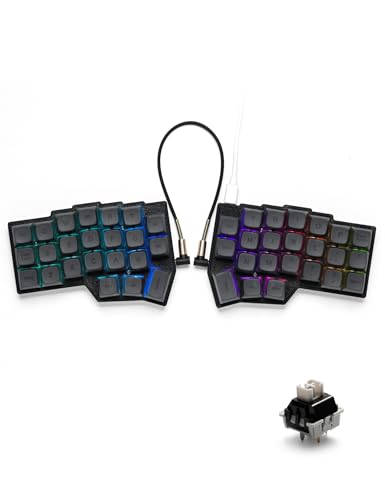
This 40% split design uses a 3×6 column-staggered layout with an ergonomic thumb cluster. It’s ideal for users seeking ease of thumb access and reduced wrist strain during long sessions. The kit supports hot-swappable 3-pin and 5-pin MX switches, and comes with pre-lubed linear switches for smooth, quick actuation. VIA and VIAL compatibility makes remapping straightforward, while RGB backlighting adds clarity in dim settings. A wired setup ensures stable performance where wireless isn’t feasible.
Who it’s best for: gamers and writers who want per-key RGB and straightforward switch customization. Caution: assembly is required if you need the full 46-key footprint feel in a 40% form factor.
YMDK Split Keyboard Corne V4.1 46 Keys
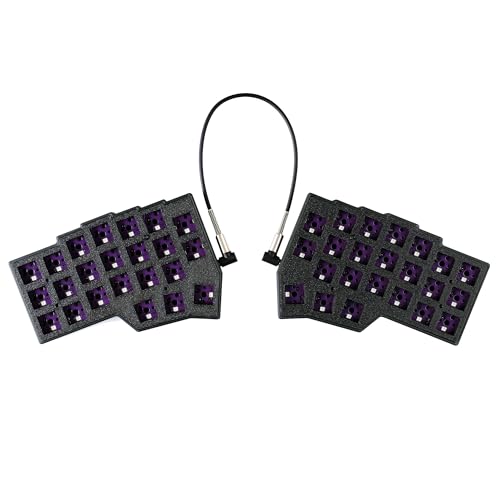
The YMDK Corne V4.1 46 Keys kit targets DIY builders who want a ready-to-assemble 40% layout. It provides Bottom PLA case pieces, Top PLA plate pieces, a hot-swap PCB, and cables—leaving you to supply switches and keycaps. The PLA material is noted as environmentally friendly, aligning with users who prefer non-toxic plastics. This kit emphasizes customization and hands-on assembly, suitable for modelers who enjoy tuning every aspect of their keyboard experience.
Who it’s best for: builders seeking a complete, make-it-yourself 40% split kit. Caution: you must supply switches and keycaps to complete the keyboard.
YIVU Corne V4 40% Split Mechanical Keyboard Kit

The YIVU Corne V4 40% Split Mechanical Keyboard Kit focuses on a barebones, wireless-ready DIY approach. It features a 46-key layout with column-staggered ergonomics to reduce strain. Hot-swappable RGB support and QMK/Vial programmability present a flexible framework for developers who want to tailor each keystroke. The kit emphasizes compatibility with a wide range of MX switches and per-key configurations for tailored workflows.
Who it’s best for: developers and DIY enthusiasts who want a modular, programmable platform. Caution: you’ll need to select and install your preferred switches and keycaps to complete the keyboard.
YIVU Corne LP Low Profile Split Keyboard

The YIVU Corne LP combines a 40% ortholinear layout with low-profile switches for a slimmer desk profile. It uses hot-swappable, low-profile switches and RGB backlighting with VIAL programmability, enabling rapid remapping and layered use without bulky keycaps. This model is ideal for users who want a compact setup without sacrificing depth of customization or programmability.
Who it’s best for: users who prefer a slim footprint and fast, low-profile typing. Caution: low-profile switches may have a different feel and require compatible keycaps for the best experience.
Buying Guide
What to consider when choosing a split 40% keyboard
- Connectivity: Do you need wireless (2.4 GHz) or wired USB-C? Wireless reduces desk clutter but can introduce pairing considerations in busy environments.
- Layout and ergonomics: Columnar-staggered vs ortholinear; number of keys per half; thumb cluster presence. Choose based on how the arrangement aligns with your natural hand posture.
- Programmability: Is QMK/VIA/VIAL support required for custom macros and layered layouts? Ensure the firmware is actively maintained and compatible with your system.
- Switch options: Hot-swappable sockets expand future switch choices. Confirm support for 3-pin and 5-pin MX-style switches if you plan to swap often.
- Build materials: PLA or PBT keycaps, case material, and switch lubrication level affect feel and durability. PBT tends to resist shine longer.
- Size and assembly: Kits require varying degrees of assembly. If you want a ready-to-use board, prefer models with pre-lubed switches or included components.
Which one should you buy?
- Best for wireless freedom and quick customization: YIVU 40% Corne Wireless Split Keyboard.
- Best for per-key RGB and VIA/VIAL workflow: YIVU Corne V4.1 Split Ergonomic Keyboard.
- Best DIY complete kit: YMDK Split Keyboard Corne V4.1 46 Keys.
- Best barebones, modular kit: YIVU Corne V4 40% Split Mechanical Keyboard Kit.
- Best slim desk footprint with low profile switches: YIVU Corne LP Low Profile Split Keyboard.
Repairability and future-proofing
- Hot-swappable sockets allow easy switch changes without soldering, extending the keyboard’s usable life.
- QMK/VIA compatibility ensures long-term software support for remapping and macro features.
- Keycap and plate material affects longevity and surface wear; PBT is typically more durable than ABS.
FAQ
- Q: Do all these keyboards support VIA/VIAL for customization? A: Most listed models offer QMK and VIA/VIAL support, but verify per model for firmware compatibility.
- Q: Can I use 3-pin and 5-pin MX switches? A: Yes, several models support both, making it easy to upgrade switches over time.
- Q: Is wireless pairing always stable? A: 2.4 GHz wireless tends to be more stable than Bluetooth in crowded environments but may require a compatible dongle and proper driver setup.
- Q: Are these ready to type out of the box? A: Some are barebone kits requiring you to provide switches and keycaps; others come with pre-lubed switches and full assemblies.
- Q: Which layout is best for long coding sessions? A: Split, columnar-staggered designs with ergonomic thumb clusters generally reduce wrist strain and improve posture during extended typing.
- Q: Do these keyboards have RGB lighting? A: Several models include RGB backlights with multiple modes and VIAL support for color customization.