Answering the common buyer question, these products convert and preserve VHS tapes by digitizing to digital formats or burning to DVD. They’re best for collectors, families preserving old home movies, and anyone who wants a simple, PC-free or PC-friendly transfer workflow. The following picks emphasize ease of use, compatibility with common tape formats, and clear output options. Below, you’ll find concise product overviews, a quick comparison table, and practical buying guidance.
| Product | Best For | Output |
|---|---|---|
| Portta VHS to Digital Converter | People who want a PC-free capture with built-in storage | MP4, MP3 |
| Roxio Easy VHS to DVD 3 Plus | Family memories that need editing features | DVD, digital formats |
| ClearClick Video to Digital Converter 2.0 | Direct USB capture from multiple sources | USB Drive/SD Card |
| Toshiba VHS to DVD Recorder VCR Combo | All-in-one hardware for home transfer | DVD |
| Honestech VHS to DVD 7.0 Deluxe | All-in-one capture with editing features | DVD, Blu-ray, digital formats |
Portta VHS To Digital Converter

The Portta device acts as a converter/recorder with a built‑in 3.0″ LCD for preview and a built-in speaker. It accepts AV/RCA (CVBS+R/L), S-Video, and AUX inputs to capture analog video and audio, storing as MP4 or MP3. It records at up to 1080P 30Hz and supports NTSC and PAL formats. This is a direct capture unit, not a player. Best for buyers who want a plug‑and‑play solution without a PC, and who need local playback on the device itself.
Best for: individuals who prioritize simplicity and want to avoid computer software. Suitable for hobbyists transferring family VHS tapes to digital storage directly to USB or SD cards. Caution: It cannot play tapes independently; it only records from connected sources. For large collections, ensure sufficient USB/TF Card capacity and power supply for high-capacity drives.
Roxio Easy VHS to DVD 3 Plus

Roxio Easy VHS to DVD 3 Plus enables transferring from VHS, Hi8, and V8 to DVD or digital formats, with editing features to trim, enhance color, reduce noise, and add transitions. It supports capturing from a VCR or camcorder and can export to DVDs or digital formats for easy sharing on devices. This option is best for users who want integrated editing features and a straightforward path to burning physical DVDs in addition to digital files.
Best for: families preserving memories with light editing and DVD creation. Better for: users who prefer a guided workflow with capture and basic post‑production tools. Caution: the package is Windows‑centric; Mac users may need alternative workflows or additional software.
VCR VHS Transfer Bundle for Digitizing VHS Tapes

This bundle focuses on transferring VHS tapes to digital files via an HDMI upconversion solution. It is designed to capture from VHS tapes to digital formats via a USB capture device. It’s a practical choice for those who want a simple stick‑and‑go setup to view tapes on modern TVs and store digital copies locally. Best for budget‑conscious users needing a straightforward transfer path.
Best for: casual collectors who want a low‑friction, USB capture solution. Helpful for: converting multiple tapes to digital files and viewing on modern displays. Caution: upconversion quality may depend on the source tape and capture interface; connectivity with newer smart TVs may require additional adapters.
Toshiba VHS To DVD Recorder VCR Combo
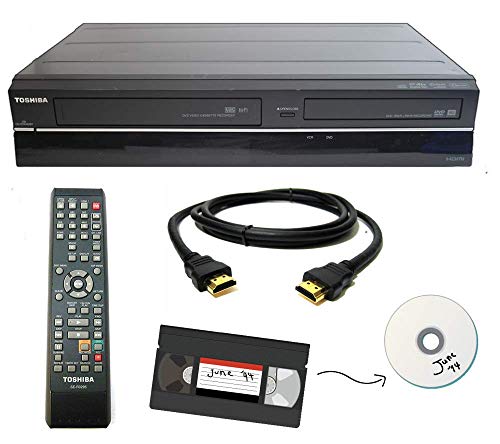
Toshiba’s combo device is designed to transfer VHS tapes to DVD with the press of a button. It’s a straightforward, all‑in‑one option that aims to simplify the transfer workflow at home. It’s best for buyers who want an integrated VCR/DVD unit that minimizes setup steps and avoids separate capture hardware. A potential limitation is that it is a refurbished/renewed listing, which may impact availability and support expectations.
Best for: users seeking a single device that handles both analog playback and DVD creation. Choose this if you want minimal setup and a device that manages the transfer without a PC. Avoid this if you need flexible digital export options beyond DVD (e.g., direct digital file formats).
ClearClick Video To Digital Converter 2.0

ClearClick 2.0 converts sources from VHS, VCRs, AV, RCA, Hi8, camcorders, and gaming systems directly to USB flash drives or SD cards. It does not upscale to HD and requires a working VCR/camcorder and tapes. It’s a good pick for those who want a simple, PC‑free capture with direct USB storage. It is not designed for modern HDMI sources and does not require a computer for operation.
Best for: users with working legacy equipment who want direct USB capture. Better for: those who want to avoid PC software entirely. Caution: not suitable for capturing from HDMI sources and relies on working analog hardware and tapes.
My Needle Store Cassette Adapter for Camcorders

This universal cassette adapter transforms VHS-C tapes into standard VHS for playback on a VCR. It’s designed to bridge legacy VHS‑C camcorder footage to regular VHS tapes, enabling playback on common VCRs and potential digitization later. It is a niche solution best for those with VHS‑C tapes and compatible VCR hardware.
Best for: users with VHS‑C tapes who want to play them on standard VHS players before digitizing. Caution: not compatible with MiniDV, Hi8, Digital 8, or other non‑VHS formats.
Buying Guide: Key Purchase Considerations
- Output goals: Do you want DVDs, MP4 files, or both? Choose devices that match your preferred end format.
- Input compatibility: Confirm whether your tapes are VHS, VHS‑C, Hi8, or other formats and ensure the device supports them.
- PC dependency: If you want simple capture, PC‑free units (with USB/SD storage) are ideal; if you want editing, consider options with post‑capture software.
- Output quality and formats: Look for devices offering up to 1080P capture or reliable DVD burning with standard formats (MP4, MP3, AVI, etc.).
- Storage and media: Check USB drive or SD card compatibility and capacity recommendations for long tapes.
- Reliability and ease of use: Favor hardware with straightforward setup, clear indicators, and built‑in playback previews when available.
Practical questions to guide your choice
- Is a PC required for my transfer? If not, a standalone converter like Portta or ClearClick is preferable.
- Do I need to burn DVDs, or only save digital files? Roxio and Toshiba options provide DVD output; others focus on digital files.
- Will I edit footage before saving? Roxio Easy VHS to DVD 3 Plus offers editing features, which is helpful for nostalgia projects.
- What tapes do I have? If you own VHS‑C or Hi8, ensure the device supports those formats or plan for a bridge approach (VHS‑C to VHS then digitize).
- How will you view the final copies? If you want direct USB playback on TVs, a device with USB/SD storage plus a built‑in player helps.
FAQ
- What is the simplest way to preserve old VHS tapes? Use a PC‑free converter that records to USB or SD, then store digital copies on a drive.
- Do these devices preserve audio as well as video? Yes, most capture both video and audio; check the supported audio formats (typically MP3 or LPCM).
- Can I edit videos after transferring? Some products include basic editing tools; others require separate software or devices for editing.
- Will these solutions work with all VCRs? Most work with standard analog outputs; compatibility depends on your VCR’s AV outputs (RCA or S‑Video).
- Is upscaling available? Some devices offer upscaling options; many do not, especially those focused on simple capture.
- Are refurbished units a good option? Refurbished models can save money, but verify warranty and condition before purchasing.