Finding an easy, reliable way to convert old video tapes into modern DVD or digital formats is a common project as you preserve memories. The following picks cover standalone converters, capture devices, and all-in-one recorders that simplify digitizing from VHS, Hi8, Mini DV, and related formats. Each product emphasizes simple setup, playback previews, and direct-to-storage options, helping you preserve video without a computer or lengthy software installs. Use this guide to compare features, inputs, and output options for a smooth digitization workflow.
| Product | Brand | Key Benefit | Inputs | Storage |
|---|---|---|---|---|
| Portta VHS to Digital Converter | Portta | No PC required, 1080P capture | AV/RCA, S-Video, AUX | USB/TF (storage not included) |
| ClearClick Video to Digital Converter 2.0 | ClearClick | Direct USB drive recording | VHS, VCR, DVD, DVR, Camcorders | USB drive / SD card (not included) |
| Portta VD22P VHS to Digital Converter | Portta | Built-in 5″ HD preview | VHS/Hi8/Mini DV/DVD | USB power source required |
| DigitPro VHS to Digital Converter 2.0 | DigitPro | One-touch capture, flexible formats | AV/RCA, S-Video | USB/TF (up to 512GB) |
| avedio links VHS to Digital Converter | avedio links | RCA to USB capture | RCA, S-Video | USB/Type-C |
Portta VHS To Digital Converter

The Portta converter provides a straightforward way to digitize analog video and audio into MP4 or MP3 formats, with a recording resolution up to 1080P 30Hz. It accepts CVBS/R/L, S-Video, and AUX inputs, allowing you to connect typical VHS players, VCRs, and camcorders. Its plug-and-play design eliminates the need for a PC or drivers, while a built-in 3.0″ display lets you preview recordings directly on the device. Note that this unit is a converter/recorder, not a standalone tape player.
Storage is flexible via USB drives or TF cards, and the device can store video as MP4 and audio as MP3. It supports multiple TV formats (NTSC and PAL varieties), with uncompressed LPCM audio output for higher quality sound. Users should ensure inputs are properly connected and volume levels are unmuted in settings for optimal capture results.
Key considerations: ensure you have a properly powered AC adapter for larger USB storage devices, verify the input type on your source, and prepare a reliable USB drive or microSD card with adequate space for longer tapes. This model is well-suited to hobbyists seeking a compact, all-in-one solution that doesn’t require a computer.
ClearClick Video To Digital Converter 2.0

ClearClick’s second-generation converter targets straightforward conversion of old tapes to digital formats without computer software. Supported outputs include SD resolutions of 640×480 or 720×480, and the device does not upscale to HD. It captures from VHS, VCRs, DVD players, DVRs, camcorders, Hi8, and retro gaming systems, provided you have a working source tape and player. The unit records directly to USB flash drives or SD cards (not included), offering a simple, portable digitization workflow.
Operational notes: a working VCR/camcorder is required to feed tape into the converter. It does not play tapes independently. This model emphasizes hand-held practicality for those who want a no-fuss capture setup with minimal components. The lack of PC dependency can be a major advantage for many users seeking a quick archival tool.
Buying tips: check USB drive capacity beforehand—512 GB or less is commonly supported across similar devices, and format compatibility with FAT32 or exFAT can streamline transfer. Make sure you have the correct cables on hand to connect from your source to the converter’s AV inputs.
Portta VD22P VHS To Digital Converter

The Portta VD22P adds a 5-inch HD LCD preview screen to the digitization workflow, providing real-time monitoring while recording. It supports a broad range of legacy formats, including VHS, Hi8, Mini DV, and camcorders, with MP4 output for easy digital archiving. The built-in preview screen helps you ensure you capture the right moment, and you can play back footage directly on the device to confirm quality before saving.
Key advantages include a sizable screen for on-device review and the ability to preserve memories in a widely compatible MP4 format. The device supports Full HD capture at 1080p 60fps for smoother playback, and flexible input options ensure compatibility with various legacy media players. As with other standalone units, ensure your source tapes are playable and that you have a reliable power source for continuous operation.
Considerations: the device’s success hinges on a working VHS player and proper power for USB-enabled storage. If you plan long sessions, consider cooling or providing adequate ventilation for the converter during extended captures.
DigitPro VHS To Digital Converter 2.0

DigitPro’s model highlights one-touch digital conversion with broad compatibility. It supports AV/RCA and S-Video inputs and captures up to 1080P 30Hz, with direct recording to USB or TF storage up to 512GB. The unit eliminates the need for a computer and includes a 3.5″ LCD screen for real-time preview and playback. It also offers advanced features like timed recording, auto pause/resume during signal loss, and scheduling.
This option suits users who want a feature-rich device with automation and scheduling. Its auto-detection of NTSC/PAL formats ensures compatibility with various regions, while the option to output HDMI gives you the flexibility to monitor on a larger display. Ensure you have a fast, reliable USB drive or SD card for uninterrupted capture, especially during longer tapes.
Practical considerations include ensuring adequate power to storage devices and selecting appropriate resolutions to balance file size with quality. The device’s scheduling and smart settings can streamline bulk digitization projects, making it a strong contender for archival tasks.
VIXLW VHS To Digital Converter

VIXLW’s capture device focuses on ease of use for digitizing from VHS, VCR, Hi8, and Mini DV to a PC or Mac. It converts analog RCA input to HD 720P USB output, enabling simple transfer to a computer for storage or editing. The device is designed to be plug-and-play with automatic recognition by compatible software, offering a straightforward path to digital archives for those who prefer working on a computer after capture.
Highlights include direct USB capture and broad compatibility with common analog sources. Because this model emphasizes PC-based workflows, it is best for users who already maintain a media library on their computer or who want to edit before burning to DVD. Always confirm driver compatibility with your operating system and whether you need additional software to complete the workflow.
Usage tips: verify that your computer recognizes the device when plugged in, use a stable USB 2.0/3.0 port, and consider organizing captured files into well-labeled folders to ease later editing and burning to DVD.
Clariviews VHS To DVD Recorder
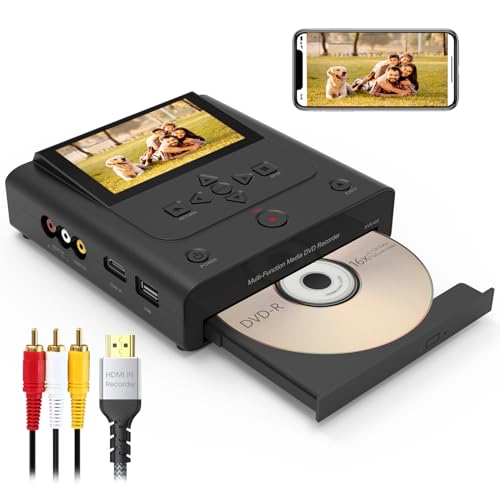
The Clariviews device combines a DVD recorder with a versatile input interface, enabling direct video recording from VCRs, DVDs, cameras, and smartphones, without a PC. It supports HDMI inputs for digital sources like Apple TV and streaming devices, expanding compatibility beyond analog tapes. An internal 4.3-inch LCD screen allows on-device preview, and the unit can output to an external monitor via HDMI up to 1080p for real-time review.
In addition to on-device recording, Clariviews offers a mobile transfer option via the “Friendly Memories” app, leveraging Wi-Fi to move videos and photos to USB drives, SD cards, or CDs. This makes it a robust all-in-one solution for households that want to digitize, preview, and transfer directly to removable storage without a computer.
Key considerations include ensuring stable HDMI connections for high-definition output, and verifying that you have the companion app installed to enable wireless transfer. This model provides a strong blend of analog-to-digital capture with modern convenience features for storage and sharing.
Portta VHS To Digital Converter With 128GB USB3.0

This Portta model bundles a 128GB USB 3.0 flash drive for immediate storage, making it convenient to begin digitization without sourcing separate storage. It retains the core feature set of its sibling Portta units: a 1080P 30Hz capture, AV/RCA and S-Video inputs, and a plug-and-play form factor that requires no PC or extra software. The built-in 3.0″ display and speaker support quick previews of captured footage, providing a compact, ready-to-use solution for immediate archival projects.
Practical tips: choose a drive with ample space to handle entire tapes, and verify that the drive is formatted correctly for the device (typical formats include FAT32). If you plan high-volume digitization, consider an external power supply for larger storage devices to avoid power-related interruptions during recording.
Buying Guide: Key Purchase Considerations And Comparisons
When selecting a video-to-DVD or digital converter, consider the following:
- Source compatibility: Ensure the device supports your tapes (VHS, Hi8, Mini DV) and your player’s outputs (RCA, S-Video, HDMI).
- Output format: MP4 is widely compatible for digital archives, while MPEG-2 DVD formats are best if you intend to burn to DVD immediately.
- Storage options: Decide between USB drives, SD cards, or USB-C drives. Check the device’s maximum supported capacity and formatting requirements.
- Preview and monitoring: A built-in LCD screen helps verify captures before saving; larger previews aid accuracy for longer tapes.
- Power and reliability: For longer sessions, ensure the storage device is powered or use externally powered hubs if required by the unit.
- Editing readiness: If you plan to edit footage, consider devices that export to common video formats and provide straightforward file organization aids.
- Ease of use: If you want a PC-free experience, prioritize standalone units with simple one-touch capture and direct-to-storage.
- Future-proofing: Look for devices supporting NTSC and PAL formats to accommodate tapes from different regions and timelines.
In practice, a balanced approach is often best: pair a standalone converter for simple captures with a PC-based workflow for editing and archiving large collections. This ensures you preserve memories efficiently while retaining flexibility for later enhancement, organization, and sharing. All models listed provide accessible ways to digitize analog media, each with unique strengths to fit various user preferences and project scales.