Preserving old 8mm film reels by converting them to digital formats is easier than ever. The following picks focus on reliability, ease of use, and good output quality for American households aiming to convert 8mm and Super 8 film to DVDs or MP4 files. Each option supports film-to-digital workflows, whether you want a standalone scanner, a transfer service, or a converter kit. Read on to compare features and find the best fit for your digitization project.
| Product | Brand | Format | Best For |
|---|---|---|---|
| KODAK REELS 8mm & Super 8 Films Digitizer | KODAK | 8mm, Super 8 | Frame-by-frame digitizing on a large onboard display |
| Sony Camcorder for 8mm Digital8 Hi8 Tape Transfer | Sony | 8mm, Digital8 tapes | Direct transfer to computer or DVD |
| Video Tape Transfer Service (VHS, Hi8, 8mm, etc.) | Time To Remember | Analog tapes and film | Turnkey digitization service with cloud delivery |
| Legacybox 3 Items | Legacybox | Film reels, tapes, slides | All-in-one digitization with cloud/DVD options |
| DigitPro VHS to Digital Converter 3.0 | DigitPro | VHS, Hi8, 8mm, DVD | Standalone 4K capture with SD card storage |
This short list focuses on five products most aligned with 8mm film to digital workflows. Each entry includes a quick look at what makes it suitable for converting 8mm film to digital formats and, where applicable, to DVD or MP4 files for easy viewing and sharing.
KODAK REELS 8mm & Super 8 Films Digitizer

The Kodak Reels Digitizer converts motion picture film strips into digital MP4 files with a frame-by-frame process. It supports 3″, 5″, 7″, 8″, and 9″ reels and uses an 8.08-megapixel sensor for enhanced clarity, contrast, and color accuracy. A large 5” onboard LCD provides live viewing and control, while oversized buttons simplify frame alignment, exposure, and tint adjustments. The unit records directly to an SD card (not included) via a micro USB connection for playback on big screens or smart TVs. This model emphasizes a standalone, serviceable workflow without requiring a computer or software.
Key features: frame-by-frame digitizing, high-definition 1080p output (no sound), touch controls on a big display, and direct SD card recording. It’s designed for users who want a self-contained solution with simple on-device prompts and hardware-based digitization rather than a computer-based workflow.
Sony Camcorder for 8mm Digital8 Hi8 Tape Transfer to Computer
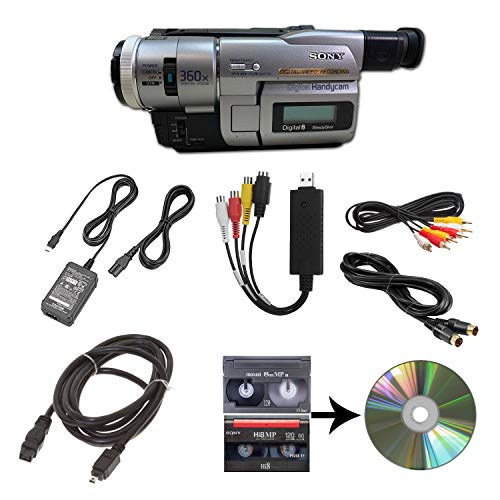
This option centers on tape-to-digital transfer using a camcorder-based workflow. The included playback capability covers 8mm, Video8, Hi8, and Digital8 tapes, with a USB capture path to computer files or direct DVD burning. It comes with power, AV and S-Video cables for flexibility in transfer and playback. While primarily a tape-to-digital solution, it’s a straightforward path for those who still have 8mm and related tapes and want a relatively simple capture routine without specialized film-to-digital hardware.
Important considerations: ease of use, compatibility with common tape formats, and the ability to output to computer or DVD. This setup suits users who already own or plan to use a compatible camcorder for the transfer process, with a focus on reliable playback and file creation.
Video Tape Transfer Service (VHS, Hi8, 8mm, 8mm Film)

This service digitizes a range of analog media, including VHS, Hi8, 8mm, and 8mm film reels, and delivers an MP4 file within about 10 business days after receipt. The package includes 1 tape transfer plus 30 days of cloud delivery via Google Drive and a complimentary recycling of media. The standard resolution is 640×480, suitable for archival viewing and basic sharing on mobile devices. This choice emphasizes a hands-off approach with professional handling and cloud access for easy retrieval.
Considerations: turnaround time, cloud delivery, and the ability to bundle multiple items under a single transfer plan. If you want a professional handoff without DIY digitization, this option provides a trusted path to digital files and convenient access across devices.
Legacybox 3 Items | Transfer Old Media to Digital
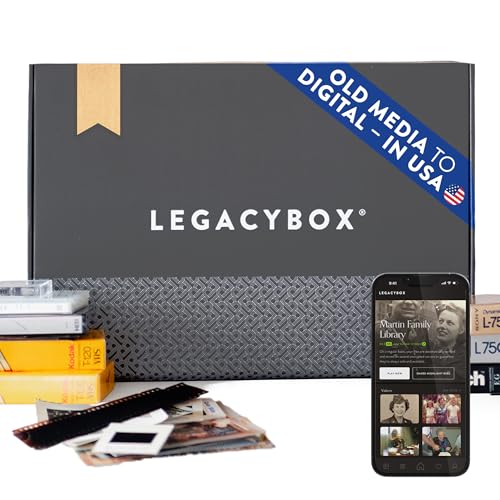
Legacybox offers an all-in-one digital conversion experience, processing three items at a time. The kit includes digitized files stored on a USB drive, with an option to add DVD/CD or cloud access. It highlights careful handling in a dedicated facility, with barcoding and tracking to secure your memories. The activation and shipping workflow are described in the instructions, and the service provides a cloud option and a memory-safe delivery of digital files. Legacybox is a well-known turnkey solution for families digitizing mixed-media collections.
Key considerations: item limits per order, inclusion of a USB drive, and optional cloud or DVD deliverables. If you want a simple, combined service for film reels, tapes, and slides, Legacybox provides an integrated path from physical media to digital storage with multiple delivery options.
DigitPro VHS to Digital Converter 3.0

DigitPro offers a standalone 4K-capable digitization workflow, designed to capture from HDMI sources and store as MP4 on an SD card or USB drive. It supports VHS, Hi8, 8mm, and DVD formats and emphasizes high-resolution output with options for 720p and 1080p in addition to 4K recording. A built-in micro input is paired with an intuitive interface that does not require a computer or software. This device aims at households seeking a robust, high-resolution, all-in-one converter with simple operation and portable storage options.
Key considerations: output resolution choices, standalone capture, and direct SD/USB storage. If you want high-resolution, no-computer digitization with straightforward controls, DigitPro provides a modern alternative that focuses on convenience and quality in a compact form factor.
Buying Guide: Key Purchase Considerations for 8mm Film to Digital
- Format compatibility: Confirm whether your reels are 8mm or Super 8, and check if the device supports both or only one format. Some systems also handle related tapes, which can affect your choice if you have mixed media.
- Standalone vs. computer-based: Standalone digitizers simplify setup and reduce the need for a PC, but computer-based options can offer more flexible editing and file management.
- Output options: Look for MP4 or other common digital formats, plus the ability to store on SD cards or USB drives. Some services provide cloud delivery or DVD copies as well.
- Resolution and color fidelity: Higher output resolutions (1080p or 4K) preserve more detail, but may require more storage. Consider whether color restoration and exposure controls are built in.
- Workflow speed: Frame-by-frame digitizing tends to be thorough but slower. If you have long reels, a balance between automation and manual control may matter.
- Service vs. DIY: Services provide professional handling and turnkey delivery, while DIY devices offer ongoing control, re-editing, and experimentation with filters and corrections.
- Storage and durability: Ensure your chosen option supports reliable storage media and backed-up copies, especially when preserving family memories.
- Cost considerations: Compare per-item pricing, setup fees, and any included deliverables such as USB drives, cloud storage, or DVDs to determine total value over time.
In selecting the right 8mm film to digital solution, consider how you plan to view and preserve the resulting files. If immediate playback on modern devices is a priority, prioritize formats and outputs that align with your viewing ecosystem. For archival-grade preservation, prioritize higher resolution, robust color fidelity, and durable storage options. Across these five options, you can align your choice with your preferred balance of convenience, control, and output quality.