Instantly upgrade your gaming space with LED-lit desks designed to boost ambiance, cable management, and ergonomic comfort. This guide highlights five top light-up gaming desks, each suited for different setups—from compact corners to expansive multi-monitor rigs. Whether you’re a competitive gamer, a home-office worker, or a streaming creator, these picks balance style, practicality, and stability.
Buyer-friendly at-a-glance: the following table summarizes the core traits of each option to help compare quickly.
| Product | Best For | Key Benefit |
|---|---|---|
| HLDIRECT 47″ LED Desk | Multimonitor setups | Two-monitor space, robust frame |
| HLDIRECT 40″ LED Desk | Spacious single- or dual-monitor setups | Large surface, strong load bearing |
| GTPLAYER 55″ LED Desk | Extended gaming rigs | Integrated mouse pad and lighting |
| Korfile 40″ L-Shape | Small spaces with corner fit | Corner design, LED lights |
| HLDIRECT 47″ with 5 Outlets | Charging-heavy setups | Power outlets and monitor stand |
HLDIRECT 47 Inch Gaming Desk With LED Lights
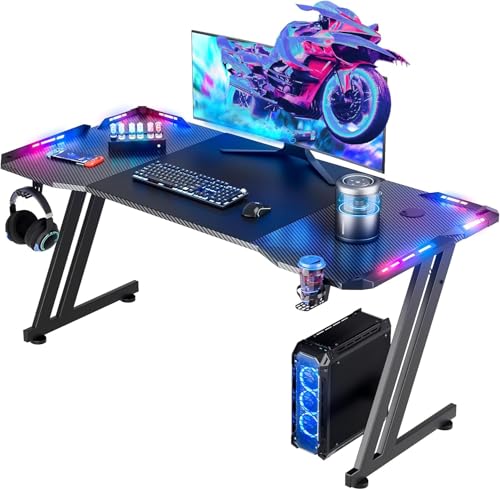
This 47-inch desk provides ample space for two monitors and an optional monitor arm, plus a cable manager to keep cords tidy. The carbon fiber desktop offers a modern look and sturdy support, with a platform capable of handling up to 150–200 lb depending on use. The 4×4 RGB LED system sits along the edges, enabling vibrant lighting that can adapt to game scenes or streaming sessions. Best for gamers who want a showpiece desk with practical cable routing and a strong, stable surface.
Best for: players with dual-monitor rigs or those who plan to mount a monitor arm. Limitation: the structural design emphasizes stability, but users should avoid placing excessively heavy gear on the edges to prevent tipping in dynamic setups.
HLDIRECT 40 Inch Gaming Desk With LED Lights
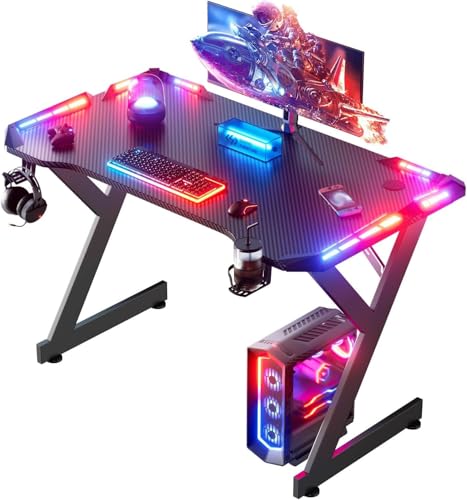
This 40-inch model offers a broad work area without overwhelming a room, paired with a cable-management system to minimize clutter. The LED lighting supports adjustable color and brightness, controlled via remote for easy emphasis during late-night gaming or work sessions. Its carbon-fiber desktop and a robust cold-rolled steel frame contribute to high load-bearing capacity and stable performance on uneven floors. Best for: gamers seeking a roomy yet compact footprint with flexible lighting.
Caution: while designed for strong loads, avoid using the surface for extreme torque or leaning heavy items that could stress the frame over time.
GTPLAYER 55 Inch Gaming Desk With LED Lights
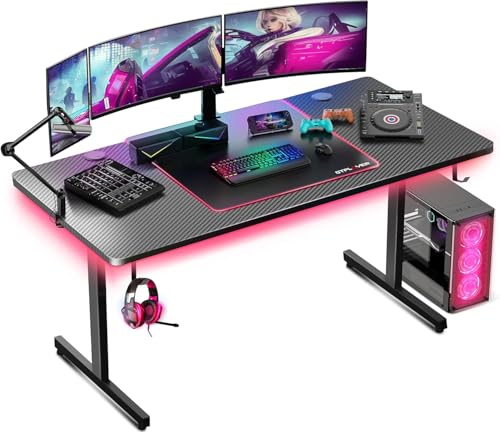
The 55-inch GTPLAYER desk delivers a large, command-focused surface with a built-in mouse pad and a headphone hook. The carbon-fiber surface provides a smooth, durable feel, while LED lighting creates customizable ambience that can sync with games or streaming. Best for gamers who want integrated accessories in a single, cohesive workstation and a surface large enough for expansive setups.
Limitation: available features rely on the desk’s bundled LED system; if lighting isn’t central to your setup, this option still stands strong as a spacious desk, but lighting personalization may be less critical for some users.
Korfile 40 Inch L-Shaped Gaming Desk

This L-shaped desk fits neatly into corners, freeing up wall space for shelves or speakers. It features a carbon fiber-like surface and an RGB LED light strip with APP control to set the mood. The reversible design allows you to position the longer side on the left or right, and the unit can be paired with another to create a U-shape for larger, immersive setups. Best for: small rooms needing a corner-friendly, modular desk with lighting. Limitation: the L-shape arrangement may require careful cable routing on tight floors.
HLDIRECT 47 Inch Desk With 5 Sockets
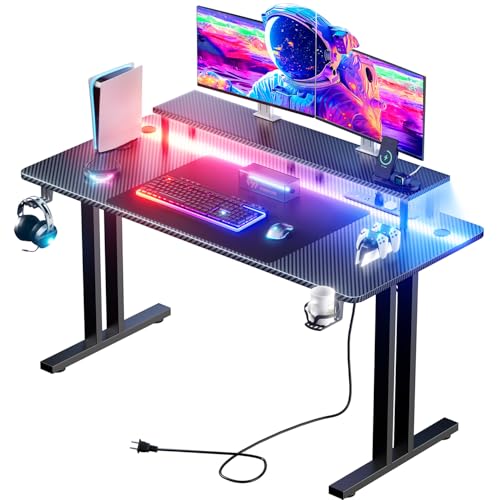
This model adds a practical power hub with three outlets and two USB ports, along with a monitor stand and a robust carbon-fiber surface. A 6.6-foot power cord offers flexible placement, and dual cable management holes help conceal wires for a tidy workstation. Best for: creators and gamers who need easy charging access, a dedicated monitor riser, and organized cabling in one package. Caution: ensure outlet availability matches your room’s power requirements to avoid overloading circuits.
Flycity 55″ Gaming Desk With LED Lights

The Flycity standing desk combines height-adjustable functionality with vibrant LED lighting and under-desk cable storage. A host shelf supports equipment while a magnetic cable system helps keep lines out of sight. The standing-height feature accommodates users who prefer to alternate between sitting and standing. Best for: gamers or creators who want an adjustable height desk with a dedicated storage approach. Limitation: the motorized lift system may require periodic maintenance for long-term reliability.
Buying Guide: Light-Up Gaming Desk Essentials
- Surface and size: Measure your room and monitor footprint to choose between compact 33–40 inch desks or larger 47–55 inch layouts. Consider if you’ll use a monitor arm or a dedicated monitor stand.
- LED lighting features: Decide between fixed LED strips, remote-controlled, or app-controlled systems. Look for color options, brightness, and lighting modes that sync with your gaming or streaming setup.
- Cable management: Favor desks with built-in cable holes, trays, and under-desk storage to minimize clutter and improve airflow around components.
- Power access: If you rely on multiple peripherals, a desk with integrated outlets or USB ports can reduce wall-wart clutter. Check the placement of outlets relative to your seating position.
- Stability and durability: Look for carbon-fiber or reinforced steel frames and robust desktop materials. Confirm load-bearing specs align with your gear weight.
- Ergonomics: A monitor stand or adjustable height can help maintain good posture. Ensure desk height matches your chair and seating position.
- Space for accessories: Consider integrated mouse pads, cup holders, headphone hooks, and storage shelves if you frequently reach for peripherals during play.
FAQ
- Do light-up gaming desks improve gameplay? They improve ambiance and can enhance focus and mood, which may indirectly affect performance. Lighting can also reduce eye strain during long sessions.
- Is a larger desk always better for multi-monitor setups? Not always. Ensure the desk depth accommodates your monitor stands and arm mounts without crowding the keyboard area.
- Can these desks be used for standing work? Some models offer standing-height adjustments or adjustable height stands, making them versatile for both sitting and standing work.
- Are the LED lights shuffle-friendly for late-night sessions? Yes, many desks include remote or app-controlled lighting with multiple modes to suit gaming or work sessions.
- What should I consider about cable management? Look for desks with dedicated cable holes, grommets, or trays to prevent clutter and improve airflow under the desk.
- Are these desks easy to assemble? Most models offer straightforward assembly, with included hardware and instructions. Verify required tools and time before purchasing.