Looking for fast, keyless entry with biometric security? Fingerprint scanner locks offer quick access, better control, and rugged durability for homes, gyms, offices, and storage. This guide highlights five top options, detailing who each lock is best for and when to choose one over another. It helps buyers avoid common pitfalls like weak weather sealing or slow recognition, and it explains how to compare features such as memory capacity, battery life, and remote access capabilities.
| Product | Best For | Key Feature |
|---|---|---|
| eLinkSmart Fingerprint Gym Locker Lock | Outdoor storage, fences, pools | Fast 0.2s fingerprint unlock |
| Evanshow Fingerprint Door Lock | Home, office, apartments | 4-in-1 access: fingerprint, keypad, keys, IC cards |
| SUMNEW Fingerprint Cabinet Lock | Cabinets, drawers, files | 0.5s unlock; auto-lock |
| USB Fingerprint Reader (Windows) | Windows PC login | Local privacy; Windows Hello integration |
| GIVERARE Fingerprint Smart Padlock | Warehouses, gyms, outdoor use | Up to 30 fingerprints; USB rechargeable |
eLinkSmart Fingerprint Gym Locker Lock

Best for outdoor storage and gate use where you need weatherproof, keyless convenience. This lock features an advanced fingerprint reader that unlocks in about 0.2 seconds, eliminating key loss and forgotten codes. It supports app-based management and remote permission sharing, making it suitable for families or property managers who want to monitor access. The construction uses alloy steel with a hardened shackle for cut resistance, offering strong durability in outdoor environments. A caution: relying on Bluetooth app access means you should keep the app updated for compatibility and check battery life in extreme temperatures.
Evanshow Fingerprint Door Lock

Best for front doors, bedrooms, or offices where flexible access is important. Evanshow combines fingerprint, keypad, two mechanical keys, and IC cards, supporting up to 100 fingerprints and 50 passwords. The 0.5-second recognition helps minimize entry delays. It requires administrator fingerprint registration before use. A USB port is available for emergency power, but it cannot charge the internal battery. Choose this if you want multiple access methods and robust password/card options, but be aware of setup requirements for initial admin fingerprint.
SUMNEW Fingerprint Cabinet Lock
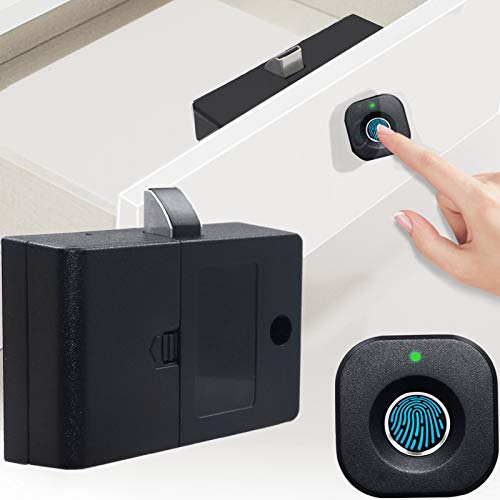
Best for keyless privacy on cabinets, drawers, or wardrobes. SUMNEW offers fast 0.5-second unlocking with no external cards or apps needed. It automatically relocks after use, helping prevent forgetfulness. The lock emphasizes privacy and item safety, making it ideal for home offices and file storage. A limitation to note: it is designed for smaller furniture and may not fit larger cabinets that require higher security integrations.
USB Fingerprint Reader for Windows 10/11

Best for computer security on Windows devices. This reader enables Windows Hello sign-in on Windows 10/11, replacing traditional passwords with a fingerprint touch. Data remains stored locally on the device, enhancing privacy by design. It does not directly authenticate with websites or apps; those experiences rely on Windows Hello and the OS. Choose this if you want biometric login for a PC rather than standalone door or cabinet locks, and remember it targets Windows ecosystems specifically.
GIVERARE Fingerprint Smart Padlock

Best for warehouses, gyms, or outdoor storage where rugged hardware and long battery life matter. The GIVERARE padlock supports up to 30 fingerprints, uses USB rechargeability, and features a zinc alloy body with a hardened steel shackle for durability and weather resistance. It delivers quick 0.2-second unlocks and promises long standby times with a full-charge lifecycle exceeding thousands of uses. A caveat: battery level indicators and charging status should be checked to avoid lockouts during long deployments without charging opportunities.
Buying Guide: How To Choose A Fingerprint Lock
- Lock type and placement: Choose a unit designed for your environment—outdoor/garage gates benefit from weatherproof housings, while indoor cabinets prioritize compact form factors.
- Access options: Decide between fingerprint only, or multi-factor options like keypad, cards, or app control. Multi-access models are better for households or teams.
- Fingerprint capacity and speed: Higher fingerprint storage reduces admin work; faster recognition minimizes entry delays in high-traffic areas.
- Power and connectivity: USB power or battery life affects reliability. App-based controls add convenience but require device compatibility and occasional updates.
- Security features: Look for hardened alloys, tamper resistance, auto-lock, and obstacle-free mounting. Check shackle material and weatherproof ratings.
- Setup requirements: Some models need a designated administrator fingerprint or initial configuration before use. Plan for a secure backup method during setup.
- Maintenance and replacement: Consider ease of battery replacement or recharging, and whether you can access the lock if power is drained.
Frequently Asked Questions
- What is the typical unlock speed for fingerprint locks?
Most models unlock in under 1 second, with some as fast as 0.2 seconds depending on the sensor and algorithm. - Do fingerprint locks work in cold or wet weather?
Quality outdoor-rated locks use weatherproof housings and durable materials to resist moisture and temperature changes. - Can multiple users be added to a fingerprint lock?
Many models support dozens of fingerprints or multiple access methods, but capacity varies by product. - Is an app always required to use a fingerprint lock?
Not always; some are standalone with fingerprint only, while others offer app-based management and remote sharing. - What is the best option for a home with kids and guests?
Look for a lock with multi-user support, temporary access sharing, and a user-friendly admin setup to avoid lost keys. - What should I check before buying a fingerprint lock?
Check compatibility with your environment, desired access methods, capacity, weather resistance, and battery life.